
The best bill reminder app for Android depends on what you need to remember. Choose Subpli for subscriptions and recurring bills with configurable advance reminders, Bill Reminder & Tracker for a straightforward one-time and recurring bill log, Bill Buddy for budgets and borrow/lend records, My Bills Reminder for paid-bill history and Google Drive backup, or Bills Reminder & Organizer for receipt attachments and reports.
Quick picks
- Best for subscriptions and recurring bills: Subpli
- Best for one-time and recurring bill status: Bill Reminder & Tracker
- Best for budgets and personal IOUs: Bill Buddy
- Best for payment history and Drive backup: My Bills Reminder
- Best for receipts, widgets, and reports: Bills Reminder & Organizer
Bill reminder apps compared
| App | Best fit | Bill types | Useful distinction | Main limitation |
|---|---|---|---|---|
| Subpli | Subscriptions and recurring costs | Recurring | 1-day, 3-day, or 1-week reminders plus monthly and yearly totals | Requires manual entry and upkeep |
| Bill Reminder & Tracker | Simple due-date and payment status | One-time and recurring | Upcoming, overdue, paid, and unpaid views with CSV tools | Narrower planning tools than the more feature-heavy options |
| Bill Buddy | Household planning and IOUs | Recurring bills and personal lending records | Category budgets, monthly insights, and borrow/lend tracking | Broader workflow can be more than a simple reminder list needs |
| My Bills Reminder | Payment history and backup | Recurring bills | Six-month history, app lock, and Google Drive backup | Less emphasis on receipt organization and detailed reports |
| Bills Reminder & Organizer | Documentation and reporting | One-time and recurring | Receipt attachments, widgets, calendar, currencies, charts, and backup | Some advanced capabilities are listed as premium features |
Important: a reminder app records the date you enter; it does not guarantee that a provider will charge the expected amount or that a canceled service has stopped billing. Confirm important dates against the provider account or latest bill.
How we chose these Android apps
We compared the current official product pages and Google Play listings using five practical questions: Does the app support one-time bills, recurring bills, or both? How early can it remind you? Can you mark bills paid and review history? Does it add budgeting, receipts, or backup? Is the workflow focused enough to keep current?
This is a source-based comparison, not a claim that we lab-tested every notification on every Android phone. Features and device behavior can change, so each section links to the current official listing.
1. Subpli: best for subscriptions and recurring bills
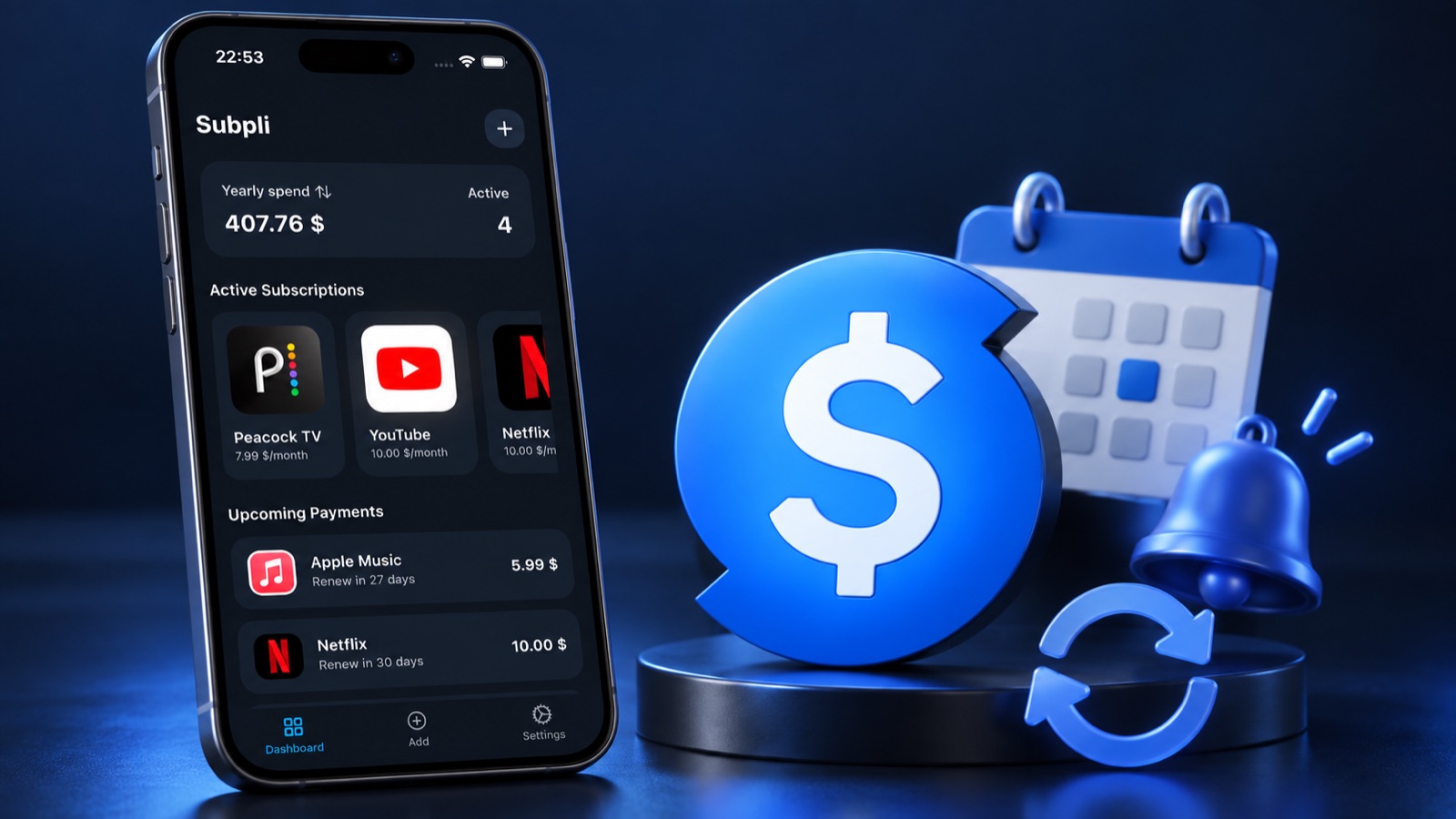
Subpli is built for subscriptions and other recurring bills. You manually add the service, amount, currency, billing cycle, and next date, then use the dashboard to see upcoming payments and monthly or yearly totals. Its current official listings document reminder choices of 1 day, 3 days, or 1 week before renewal.
Categories, a catalog of common services, custom entries, and multi-currency support make it useful when your recurring list includes more than streaming subscriptions. Zappira develops Subpli and publishes this roundup; the app is included because its documented workflow closely matches recurring-payment planning, not because every bill-reminder job is the same.
Choose it if: most of the payments you forget are subscriptions or other repeating costs, and you want different reminder lead times plus a clear recurring-spend overview.
Limitation: Subpli depends on the information you enter and maintain. Its listings focus on recurring payments rather than a one-time bill ledger with paid/unpaid history, so choose a broader bill organizer when that is your main need.
Review the current device requirements and product details in the verified store for your platform.
2. Bill Reminder & Tracker: best for a simple bill ledger
Bill Reminder & Tracker supports both one-time and recurring bills. Its current Google Play listing describes local reminders, upcoming and overdue views, paid/unpaid status, monthly totals, payment history, and CSV import or export.
Choose it if: you want a direct ledger where a bill can move from upcoming to overdue to paid, including charges that do not repeat.
Limitation: the listing emphasizes tracking and status more than category budgets, receipt attachments, or the richer reporting found in broader organizers.
3. Bill Buddy: best for budgets and borrow/lend records
Bill Buddy combines recurring-bill reminders with category budgets, monthly insights, six-currency support, and personal borrow/lend records. Its listing also describes up to three reminders for a bill.
Choose it if: the same app should remind you about regular household costs, show category-level planning, and remember money borrowed or lent.
Limitation: that wider scope adds more concepts to maintain. A focused reminder list may be quicker when you do not need budgets or personal IOUs.
4. My Bills Reminder: best for payment history and backup
My Bills Reminder focuses on recurring bills, upcoming and overdue notifications, paid status, and a six-month payment history. Its current listing also documents an app lock and Google Drive backup.
Choose it if: you want to confirm what was paid recently and value a documented backup path for your bill records.
Limitation: the current listing describes a smaller organization toolkit than receipt-centered apps with widgets, calendars, and detailed charts.
5. Bills Reminder & Organizer: best for receipts and reports
Bills Reminder & Organizer is the most documentation-oriented option in this group. Its listing covers single and recurring bills, daily notifications, receipt attachments, widgets, categories, a calendar, broad currency support, charts, reports, and backup.
Choose it if: attaching proof, reviewing reports, or keeping a calendar and widget view matters as much as the reminder itself.
Limitation: the listing places some advanced dashboard, report, and restore capabilities in its premium feature set. The larger toolkit also requires more setup than a minimal reminder list.
Which bill-reminder workflow fits you?
- Mostly subscriptions and repeating costs: start with Subpli.
- A mix of one-time and recurring bills: choose an app with explicit paid/unpaid and overdue states.
- Budget limits shape your decisions: look for category budgets and monthly insights.
- You need proof and records: prioritize payment history, backup, receipt attachments, or export.
- You only need an alert: a calendar may be enough, but a dedicated app gives the reminder bill-specific context.
Do not choose by feature count alone. A smaller app that you update after every change is more useful than a detailed system whose dates become stale.
A reliable five-minute setup on Android
- Add one bill due within the next few days as a test.
- Enter the due date from the latest provider bill, not from memory.
- Choose a lead time that leaves enough time to act.
- Open Android Settings and confirm the app is allowed to send notifications. Google notes that exact menu names can vary by device.
- Make sure the notification is alerting rather than silent if missing it would matter.
- After the test alert arrives, add the rest of your recurring list.
- Review dates monthly and update any amount, cycle, or canceled item.
Google’s official Android notification guide explains how to manage app notifications, alerting versus silent behavior, and lock-screen visibility. Android can also pause notifications from apps that remain unused, so a reminder tool still needs occasional attention.
A simple bill-entry template
For every recurring payment, record only the details that support a future action:
- Provider or bill name
- Amount and currency
- Next due date
- Monthly, quarterly, or annual cycle
- Reminder lead time
- Payment method nickname
- Account or cancellation page in notes, when the app supports notes
This is enough to answer the two questions that matter most: “What is due next?” and “What do I need to do before then?” For a deeper recurring-cost workflow, see our guide to tracking subscriptions without linking a bank account.
Final recommendation
Choose Subpli when recurring subscriptions and bills are the main problem and configurable advance reminders are the priority. Choose Bill Reminder & Tracker for one-time bills and clear payment status, Bill Buddy for budgets and IOUs, My Bills Reminder for recent history and Drive backup, or Bills Reminder & Organizer for receipts and reports.
If you are comparing manual subscription tools more closely, our Subpli vs Bobby comparison explains their platform and workflow differences. iPhone users can also compare the best subscription tracker apps for iPhone.
Frequently asked questions
What is the best bill reminder app for Android?
Subpli is the best fit in this comparison for subscriptions and recurring bills. Bill Reminder & Tracker is a better fit when one-time bills and paid/unpaid status matter, while Bills Reminder & Organizer is stronger for receipts and reporting.
Can Android remind me before a bill is due?
Yes. The apps in this roundup publish reminder features, but available lead times differ. Enter an accurate due date, permit app notifications in Android Settings, and test one alert before depending on the system.
Is a bill reminder app better than Google Calendar?
A calendar is enough for a simple recurring alert. A dedicated bill reminder is more useful when you also need paid status, overdue views, totals, history, categories, receipts, or bill-specific notes.
Do bill reminder apps pay or cancel bills?
Do not assume they do. The apps reviewed here are presented as reminder and organization tools. Pay or cancel through the provider or payment service, then update the tracker so its status remains accurate.