
Choose Subpli if you want to keep a trial’s first paid date alongside your ongoing subscriptions. Choose TrialBell if you want a dedicated cancel-by workflow. Use Apple Reminders if you mainly need one clearly timed decision task. Whichever you choose, enter the deadline when you start the trial—not after a charge appears.
These three trial reminder apps for iPhone solve different parts of the same problem. A reminder can prompt a decision, but it does not cancel a trial or guarantee that a payment will be avoided.
Trial reminder apps for iPhone: the short comparison
| App | Useful fit | Reminder approach | Main trade-off |
|---|---|---|---|
| Subpli | Trials alongside recurring subscriptions | Renewal alerts 1, 3 or 7 days ahead | You must translate trial terms into an accurate manual record |
| TrialBell | A trial-specific cancel-by list | Cancel-by/renewal reminders and saved cancellation links | Manual entry; opening a link does not cancel for you |
| Apple Reminders | One or a few decision tasks | A task with an explicit date/time and reference details | You supply the deadline and maintain the task yourself |
Selection is based on official listings and documentation checked on 16 October 2026. We compared deadline handling, reference information and ongoing upkeep—not review scores, notification reliability or claimed savings. This is not a hands-on notification test.
Record four dates or details before choosing an app
“The trial ends Friday” is not a complete reminder. Copy the actual terms from your signup confirmation and keep this small record:
- Trial end and first charge: record the confirmed date, time and time zone when supplied, plus the amount and currency of the paid plan. Do not assume the end date and charge time are identical.
- Cancel-by deadline: record the provider’s requirement separately. Do not let a reminder app invent the policy for you.
- Decision reminder: choose an earlier point when you can actually sign in and act, with time to resolve access problems.
- Billing route: note whether Apple or the provider bills you, the account used and where to manage the plan. Do not save passwords or full card details.
For an Apple trial you do not want to renew, Apple advises canceling at least 24 hours before it ends. Check the actual terms for provider-billed trials. A warning on the final day may be too late.
1. Subpli: keep the first paid date with ongoing subscriptions
Subpli is Zappira’s subscription manager, and Zappira publishes this site. Its current iPhone listing documents subscription records with costs and notes, upcoming payments, monthly/yearly totals and reminders one day, three days or one week before renewal.
For a trial, a practical manual approach is to record the confirmed first paid date and the future paid amount, then choose an alert early enough to precede the cancellation deadline. Use the notes for the trial terms and billing route. This is a suggested use of renewal tracking, not a claim that Subpli detects trials or calculates their cancellation policies.
The product illustration uses Subpli’s real dashboard and official icon. Its sample services and amounts are demonstration data from the source screen, not current offers or a forecast for your trial.
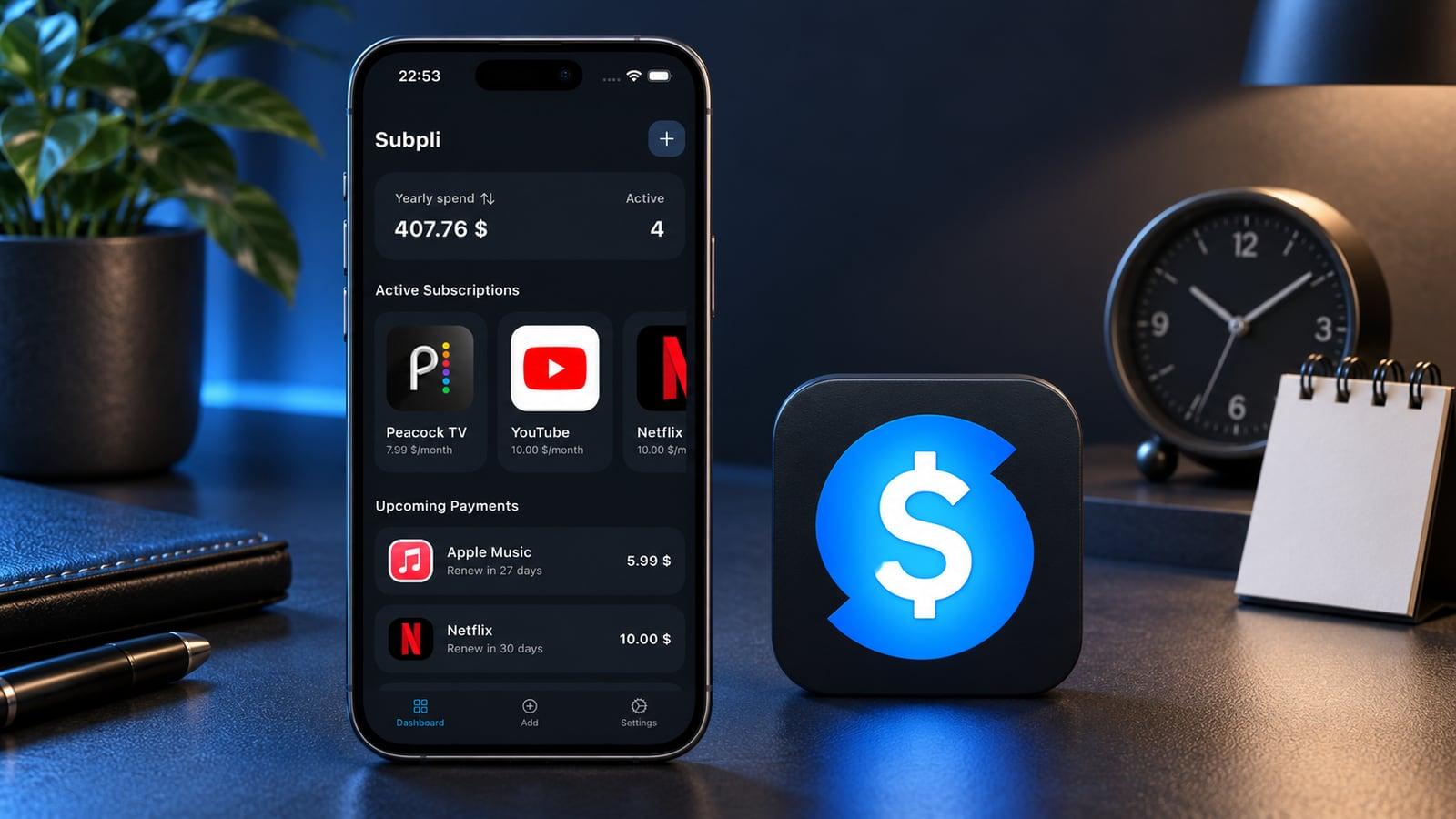
Choose it when: you want the trial to become part of a maintained subscription list if you keep it. Watch out: future paid amounts can affect your spending overview; do not read them as money already charged during the trial. Update the record after your decision, and do not assume completing a tracker entry cancels the service.
If this subscription-focused workflow fits, review Subpli’s current official listing for your device. It is available on iOS and Android; this roundup focuses on iPhone.
2. TrialBell: a dedicated cancel-by workflow
TrialBell is more explicitly organized around trials and their cancellation deadlines. Its official iPhone listing describes manual trial/subscription entries, cancel-by and renewal dates, Today and Calendar views, and saved cancellation pages. Reminder choices include the same day or one, three or seven days before.
That makes it a useful alternative when “what must I decide before this trial ends?” matters more than maintaining a general task list. The image below is a neutral editorial illustration of an earlier decision point and a later charge—not a TrialBell screen.

Choose it when: you want trial deadlines and cancellation references together. Watch out: the listing requires iOS 17 or later and explicitly says the app cannot guarantee notifications or prevent charges. Opening a saved cancellation page is not the same as completing cancellation; verify the result with the billing company.
3. Apple Reminders: one deliberately timed decision task
Apple Reminders is a sensible starting point when you have one trial to evaluate and do not need a subscription dashboard. Apple’s guide documents dated reminders, custom times, notes and URLs.
Create a reminder named for the action, such as “Decide whether to keep the editing trial.” Give it an explicit date and time before the cancel-by deadline, then add the account reference and management URL. Apple says a date without a time defaults to a 9 a.m. notification; an explicit time makes your intention clearer.
This editorial illustration represents one scheduled task with supporting reference information. It is not an Apple interface or a promise of automatic trial tracking.
Choose it when: a short task list is enough. Watch out: you—not the task—must determine the safe deadline. Mark it complete after making and recording the decision, not merely after seeing the alert. If the service continues, maintain any later reminder separately.
A worked example: leave time to act
Suppose a fictional trial ends on 20 November at noon and its confirmed cancellation deadline is 19 November at noon. A decision reminder on 17 November gives you a buffer; a notification on 20 November does not. These dates illustrate the difference, not a universal rule for all trials.
In a renewal tracker, check whether the chosen lead time lands before the deadline. In a cancel-by tracker, verify the entered deadline against the confirmation. In a task app, schedule the decision itself. Do not change the real first-charge date merely to move an alert earlier; that would make the record misleading.
Before relying on any workflow, check notification permission, confirm the saved date and keep the signup details accessible. If you cancel, save the confirmation and update the tracker or task. No app choice removes that final check.
Which app should you start with?
Subpli fits a trial that belongs in your wider subscription list. TrialBell fits a trial-first, cancel-by workflow. Apple Reminders fits a small number of explicit decision tasks. Choose the least complicated system you will update at signup and after your decision.
For ongoing plans rather than trial deadlines, compare our subscription tracker app shortlist. If you are trying to identify an existing charge or find the right cancellation route, use the forgotten-subscription audit guide instead.