

Yes—Rocket Money supports manually adding bills and subscriptions, so a bank link is not the only way to keep a recurring-payment list. Its current help guide points to Recurring → + for manual entries. Stay with that option if it meets your needs; consider Subpli if you prefer a focused renewal tracker with manually maintained records and advance reminders.
If your question is “can you use Rocket Money without linking bank account details?”, separate two jobs: recording a renewal you already know about and automatically finding charges in a transaction feed. Manual records can do the first; they do not reproduce the second. This comparison uses current official documentation, not a claim of hands-on testing.
At a glance: which workflow fits?
| Decision | Rocket Money | Subpli |
|---|---|---|
| Starting information | Add known bills and subscriptions manually | Enter known subscriptions manually |
| Automatic discovery | Connected bank/card transactions power automatic recurring detection; a manual list is different | Manual-entry workflow; bank-fed discovery is not verified |
| Renewal focus | Recurring list within a broader personal-finance app | Monthly/yearly totals, upcoming renewals and 1-, 3- or 7-day advance alerts |
| Cancellation help | Current Premium cancellation assistant, with provider restrictions | Provider-cancellation service is not verified; use the billing provider |
| Best reason to choose it | You already use Rocket Money or value its wider tools | You want a separate, focused renewal list and will keep it updated |
The comparison is about documented workflow, not a claim that one app replaces every function of the other. See Rocket Money’s recurring-payment guide and Subpli’s product details for the underlying feature descriptions.
Rocket Money: try the manual option before switching
Rocket Money’s guide for an unsupported primary bank explicitly documents manual bills and subscriptions through the Recurring tab’s plus symbol. It also says its subscription-cancellation feature remains an option. That is an important distinction from saying the app is unusable without a supported primary bank.
What manual entry does not supply is a stream of transactions from an unconnected account. Rocket Money describes automatic recurring detection as analysis of connected bank and card transactions. If you choose a manual list, you are responsible for adding services and correcting renewals when they change.
The neutral illustration below contrasts a transaction input with a manually maintained record. It is an editorial concept, not a Rocket Money screenshot or a demonstration of its interface.

Cancellation assistance is a separate decision from recordkeeping. Rocket Money currently documents its Subscription Cancellation Assistant as a Premium feature. Some subscriptions must be canceled with their billing platform, and some providers impose other restrictions. A submitted request is not the same as confirmed cancellation.
Stay with Rocket Money’s manual option if your recurring list is already useful there and you want to avoid rebuilding it elsewhere. If your reason for leaving is only “I thought manual entries were impossible,” check that documented option first. This guide does not assume every version or onboarding screen follows an identical path.
Subpli: choose a focused renewal list
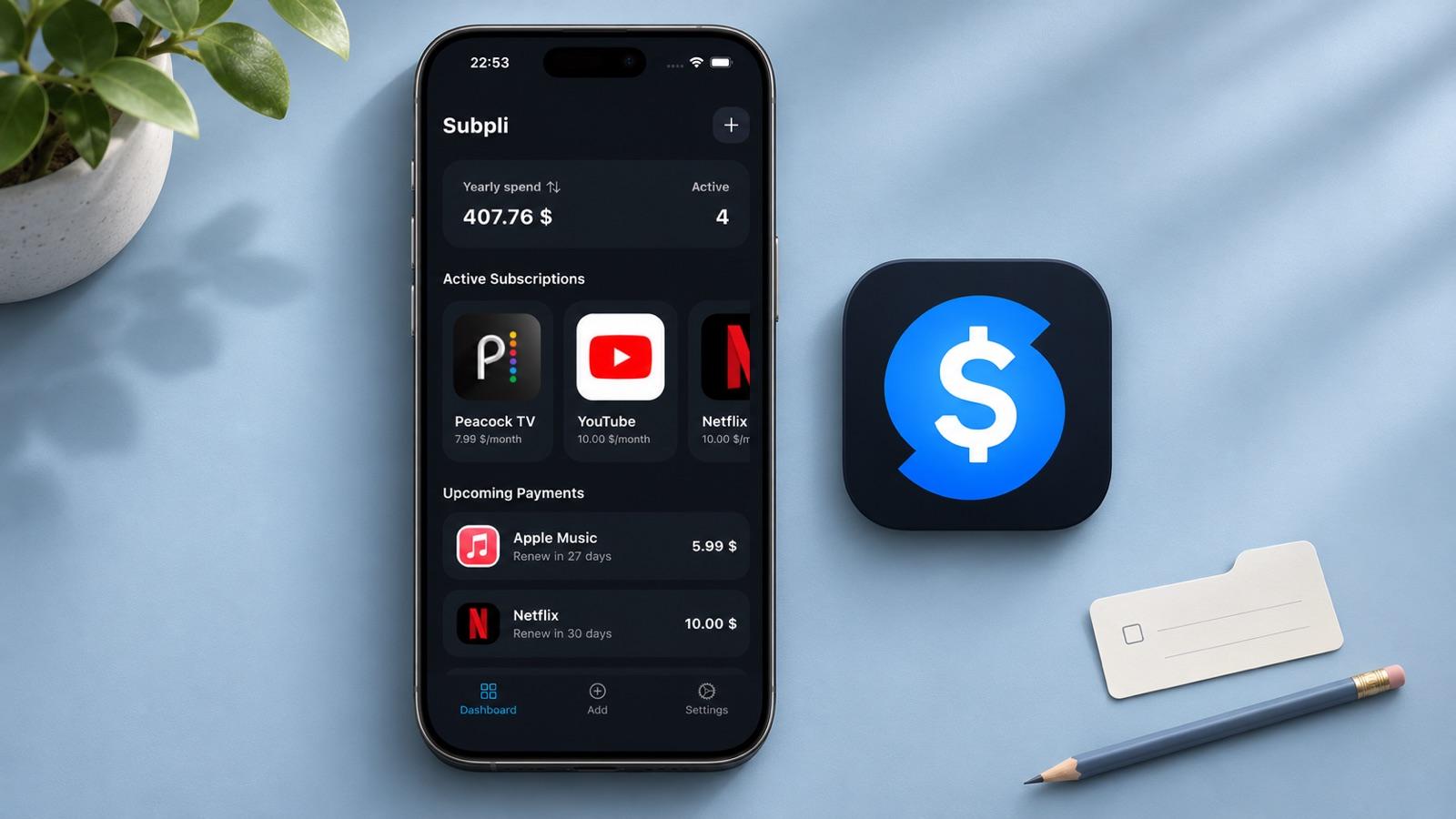
Subpli is Zappira’s subscription tracker for iOS and Android. Its documented workflow centers on manually recorded recurring payments, monthly and yearly totals, upcoming renewals, and reminders 1, 3 or 7 days in advance. It also describes a service catalog, categories and currencies. The point is a list you maintain intentionally, rather than a promise to discover every forgotten charge for you.
Choose it when the task is “show me what renews and remind me before it happens.” Do not choose it expecting a replacement for Rocket Money’s connected transaction history or cancellation team: those capabilities are not verified for Subpli. This comparison also makes no promise that Rocket Money records can be imported automatically.
The fresh product illustration uses Subpli’s real dashboard and official icon as references. Amounts and service names shown are sample interface content, not current competitor prices or your own spending.
Check the current official listing for your device before installing Subpli:
If you only need a record for one or two renewals, a calendar reminder or a plain note may be sufficient. A dedicated tracker is useful when the overview and repeatable review habit matter enough to justify maintaining another app.
A practical stay-or-switch decision
- You know your services and already maintain Rocket Money: try its manual recurring entries before moving. Switching apps does not remove the manual upkeep.
- You want a renewal-focused space separate from wider finance tools: compare a few known renewals in Subpli and decide whether its totals and reminders suit you.
- You need to discover unknown charges automatically: neither a manually entered Rocket Money list nor Subpli’s verified manual workflow replaces transaction-based discovery.
- You rely on an active cancellation request or account history: resolve what you need to retain before changing the existing connection.
For example, a reader with six known services and changing annual renewal dates needs accurate dates and an effective review habit. A reader who cannot identify several recurring statement charges has a discovery problem first. Those are different jobs; selecting a cleaner list does not solve the second one. For the broader record-building process, use our guide to tracking subscriptions without linking a bank account.
Before unlinking or moving: preserve what matters
You do not need to disconnect an existing account merely to evaluate a different tracker. Rocket Money’s account-disconnection guide warns that unlinking permanently removes associated history, categorization, transaction edits, alerts and in-progress subscription cancellations. Relinking does not recover that removed information. It also says disconnecting a bank does not cancel a Rocket Money Premium membership.
- Review dependencies: identify any history, notes, alerts or pending requests you still rely on. Read the current unlinking warning before taking that step.
- Evaluate reversibly: enter a few known renewals in the candidate tracker and compare dates and totals against the billing source. Do not assume a migration feature exists.
- Choose a source of truth: once you decide which record to maintain, avoid leaving two contradictory lists of next-payment dates.
- Keep cancellation separate: verify confirmation from the billing provider or responsible platform. Removing a record from a tracker is not proof that billing has stopped.
Bottom line: Rocket Money’s manual option is a real starting point, not something to dismiss to justify an alternative. Subpli is worth considering when a focused, manually maintained renewal overview is the job you want done. Pick based on that job—and the information or services you would leave behind—not the assumption that every subscription app requires a bank connection.